A warehouse management system (WMS) is software that directs and records every physical movement of stock inside your four walls. It tells the operator where to put a pallet, which location to pick from, in what sequence, and it captures each action as it happens, usually with a barcode scan. The result is a live, trustworthy picture of what you have and where it is.
That is the short answer. The longer answer matters, because "we already track stock in our ERP" is the most common reason companies delay a WMS and then spend years absorbing the cost of not having one.
Prefer the full paper? This article is the web edition of our foundation whitepaper. Download the 9-page PDF — twelve chapters, the cost mechanisms, a readiness scan and a business case structure you can take into a finance review.
In short
- What it does: directs receiving, putaway, replenishment, picking, packing and shipping, and records each step by scan.
- Why not just ERP: an ERP records that stock exists; a WMS controls where it is and who touched it.
- Who needs one: operations where stock counts are argued about, peaks are absorbed with temps, or traceability would not survive an audit.
- What it costs: a cloud WMS is a monthly subscription plus a one-off implementation; payback is usually counted in months, not years.
- How long it takes: weeks when processes are configured, quarters when they are programmed.
Choosing one? Our full decision guide covers types, cost, selection, RFP requirements and implementation in one place: the complete warehouse management system guide.
For what a warehouse management system directs, when you actually need one and where the line sits with your ERP, see the product page.
What a WMS actually does
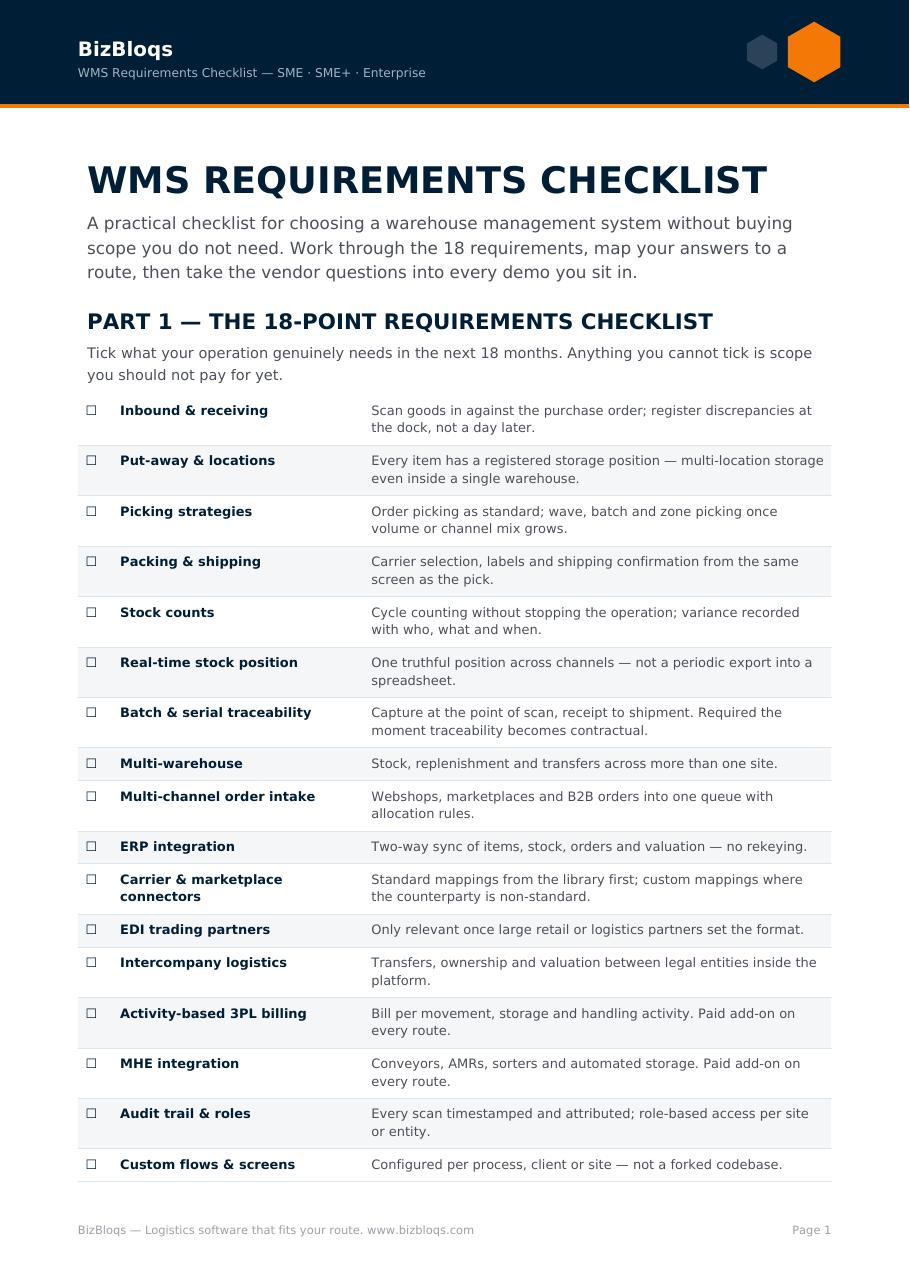
- Receiving: scan inbound goods against the purchase order, flag shortages and damages at the dock instead of at month-end.
- Putaway: the system chooses the location based on rules — velocity, temperature, batch, hazard class — rather than leaving it to whoever is on shift.
- Inventory control: location-level stock with batch, serial, expiry and lot traceability, plus cycle counting instead of an annual shutdown.
- Replenishment: pick faces are topped up automatically before they run dry.
- Order picking: single, batch, zone or wave picking with a routed path and scan verification on every line.
- Packing and shipping: carton logic, carrier selection, labels and documents generated from the order, not retyped.
- Audit trail: who did what, where and when — the evidence base for quality, recalls and customer claims.
WMS versus an ERP stock module
An ERP knows how much stock you own in financial terms. A WMS knows where that stock physically is and directs the people who touch it. ERP inventory modules are administrative: they are excellent at valuation, purchasing and reconciliation, and thin on execution — no directed putaway, no zone logic, limited scanning, weak batch control at speed.
The practical test: if your team keeps a spreadsheet, a whiteboard or a memory of "where things really are" alongside the ERP, you do not have warehouse management. You have stock accounting plus tribal knowledge.
Why SMEs move from manual to scan-driven
Manual operations do not fail loudly. They leak: mispicks that become credit notes, stock write-offs discovered too late, an extra temp per shift during peak, and a founder who is the only person who can answer a customer question. Those are all cash costs, and they scale linearly with volume.
A WMS converts that into fixed, measurable process: accuracy above 99%, onboarding a picker in a day instead of a month, and a real-time answer to "where is order 4471" without walking the floor.
The main benefits, in plain numbers
- Inventory accuracy: from typical 85–95% manual accuracy to 99%+ with scan verification.
- Picking productivity: routed picking and fewer search walks generally free 20–30% of picker time.
- Error cost: each mispick carries the return shipment, the replacement, the admin and the customer relationship — a WMS removes most of them at source.
- Space: rule-based putaway and slotting recover storage capacity you already pay rent on.
- Compliance: batch, expiry and serial traceability that survives an audit or a recall.
Types of WMS
Standalone, cloud-based (SaaS), ERP-integrated, supply-chain-suite and 3PL multi-client systems all carry the same label and solve different problems. We break down the trade-offs, costs and failure modes of each in our companion guide, Types of Warehouse Management Systems Explained. A shorter overview of the five types sits inside the WMS guide.
How to know you are ready
- Stock figures are argued about rather than trusted.
- Peaks are absorbed with temps rather than throughput.
- New staff need weeks before they are productive.
- Order volume across channels is growing faster than your ability to check it.
- A recall, audit or large customer would expose gaps in traceability.
Where the money actually goes
The cost of not having a WMS is mostly invisible, because it is absorbed rather than invoiced. It shows up as hours, not as line items. Take each mechanism below, put your own numbers against it, and stop there — an estimate you built beats a benchmark you borrowed.
| Cost mechanism | How it is absorbed today | How to size it |
|---|---|---|
| Search time | Pickers walking to a location that is empty or wrong, then hunting. | Minutes lost per pick × picks per day × loaded hourly cost. |
| Re-picks and corrections | A second touch on an order that was already picked once. | Corrections per week × average handling time × cost per hour. |
| Mis-shipments | Return freight, replacement goods, credit notes, and the call handling. | Incidents per month × fully loaded cost per incident. |
| Safety stock | Extra stock held because the number is not trusted. | Excess inventory value × your cost of capital and storage. |
| Peak temporary labour | Extra bodies hired to compensate for an unguided process. | Peak agency hours × rate, minus what a directed process would need. |
| Supervision | Team leaders answering “where is it?” instead of managing flow. | Supervisor hours spent on lookups × cost per hour. |
| Stock counts | Full or partial shutdowns to re-establish a trustworthy number. | Count days × people involved, plus lost throughput. |
| Audit and recall exposure | Time to reconstruct a batch trail, and the risk if you cannot. | Hours per trace request; the risk line is a board conversation. |
We deliberately publish no benchmark percentages here. Sector averages are the fastest way to lose a business case in a finance review, because the first question is always “whose warehouse?”. Six of your own honest numbers are worth more than sixty borrowed ones. Our ROI calculator walks the same mechanisms with your inputs.
The four ways a WMS is delivered
| Delivery model | What it suits | What to watch |
|---|---|---|
| ERP warehouse module | Single-site operations with simple flows already deep in one ERP. | Location logic is usually shallow; scanning is often an add-on rather than the backbone. |
| Best-of-breed WMS | Complex, high-volume operations with dedicated IT capacity. | Powerful, but the integration and the customisation backlog become permanent costs. |
| 3PL / multi-client WMS | Logistics service providers billing per client, per activity. | Client-specific rules and billing are the core requirement; not needed if you own the goods. |
| Configurable service (BPaaS) | Operations that want control fast, without building software. | Fit depends on how much of your process is genuinely unique — usually far less than assumed. |
The honest test between models is not a feature grid. It is this question: when your process changes next spring, who has to be involved, and how long does the change take? If the answer is a development ticket and a release window, you have bought a software project. If the answer is a configuration change made by someone who understands your operation, you have bought a service.
Data and integration: the part that decides the project
More WMS implementations stall on data ownership than on functionality. Before any build begins, one table needs agreeing: for each record type, which system is the master, which direction the data flows, and what happens on conflict.
| Record | Typical master | Flows to WMS | Flows back |
|---|---|---|---|
| Article / SKU master | ERP | Article, unit, weight, dimensions, batch policy | New packaging data measured on receipt |
| Purchase orders | ERP | Expected inbound lines | Receipt confirmation, quantity, batch, discrepancy |
| Sales orders | ERP / webshop / marketplace | Order lines, ship-to, priority, carrier preference | Pick and pack confirmation, serials, shipment |
| Stock position | WMS | — | Location-level truth, adjustments, counts |
| Carrier data | Carrier platform | Service, label format, cut-off times | Track and trace, manifest, weight |
| Returns | ERP / webshop | Expected return, reason code | Inspected result, restock or scrap decision |
Two rules save most of the pain. First, stock position is mastered by the WMS once it goes live — running two masters guarantees a permanent reconciliation task. Second, every interface needs a defined failure behaviour: what the floor does when the ERP is unreachable for two hours. An operation that stops when a queue backs up has not been integrated, it has been coupled.
Implementation: configured, not constructed
The single largest variable in implementation length is whether your processes are configured or programmed. Configuration means describing your rules in a system built to receive them. Programming means changing the system so it can hold your rules. The first is measured in weeks and stays flexible; the second is measured in quarters and hardens over time.
| Phase | Typical span | What has to be true at the end |
|---|---|---|
| Process capture | Weeks 1–2 | Every flow drawn, exceptions named, data ownership agreed and signed. |
| Configuration | Weeks 2–6 | Locations, zones, rules, documents and labels set up in a test environment. |
| Integration | Runs in parallel | Interfaces live in test, with defined behaviour when a system is unreachable. |
| Validation | Weeks 6–8 | The operation runs a real day on test data, including the exceptions. |
| Cutover | One weekend | Counted, loaded, reconciled; the floor starts Monday on the new system. |
| Stabilisation | Weeks 9–12 | Daily metrics reviewed, rules tuned, temporary workarounds retired. |
Spans are indicative for a single-site operation with cooperative source data; multi-site and heavy customisation extend them. Three failure patterns are worth naming in advance. Scope drift through exceptions: every “but sometimes we…” added to phase one turns a configuration into a build. Unowned data: article dimensions nobody has measured become the reason go-live slips. A cutover without a fallback: you need a written answer to what happens if Monday goes badly, agreed before the weekend, not during it.
Building the business case
Most WMS business cases are rejected for a structural reason, not a financial one: they lead with what the system costs instead of with what the current process costs. Cost is the front door; return is the conversion. A defensible case has four parts:
- Today's cost, measured. The mechanisms above, with your own numbers and your own assumptions written down next to them.
- The mechanism of change. Not “efficiency” — the specific behaviour that disappears. Directed putaway removes search time; scan-verified packing removes mis-shipments.
- The investment, in full. Subscription, implementation, hardware, internal hours and the cost of the cutover weekend. Underspecifying this is what kills credibility in review.
- The payback horizon. Express it in months and state the sensitivity: what has to be true for it to be two months, and what makes it six.
Then apply the discipline test: is that a four or a six? If your payback estimate moves from four months to six under a pessimistic assumption, the case is robust and you should proceed. If it moves from four months to four years, the driver you chose is not the real driver — go back and find the mechanism that actually dominates your cost per order.
Common questions about warehouse management systems
What does a WMS do that an ERP does not? An ERP records that stock exists and what it is worth. A WMS decides where each item goes, tells the operator which location to pick from and in what order, and confirms each step with a scan. Valuation versus execution — that is the whole difference.
Do I need a WMS if I only have one warehouse? Site count is not the trigger. The trigger is whether work is directed. A single site with daily picking, multi-channel orders or batch traceability obligations benefits more than a two-site operation shipping a handful of pallets a week.
How much does a WMS cost? A cloud WMS is a monthly subscription plus a one-off implementation, and the honest comparison is not against zero — it is against what the current process costs in search time, corrections, mis-shipments and peak labour. Size both sides with the mechanisms in the table above, or model your own figures with the calculator linked above. The detailed breakdown sits in what a WMS costs.
How long does implementation take? Weeks when your processes are configured; quarters when they are programmed. The phased spans above assume a single site with cooperative source data.
Which type of WMS should I choose? Match the delivery model to how often your process changes and who is allowed to change it. The five types, with their trade-offs and failure modes, are compared in types of warehouse management systems.
Can a WMS work with my existing ERP? Yes, provided data ownership is agreed per record type before the build starts — see the integration table above. Stock position is mastered by the WMS once it goes live; everything else keeps its existing master.
What does a WMS need from the warehouse itself? Named, labelled locations, reliable scanning coverage and article data that matches reality. Unmeasured dimensions and unlabelled racking are the two most common reasons a go-live slips.
Where BizBloqs fits
BizBloqs delivers warehouse and order management as a configurable service — enterprise-grade execution at a cost structure a small or medium business can carry, with integrations to ERP, webshops, marketplaces and carriers included in the design rather than bolted on later.
If you want to see what the change is worth in your own numbers, run the ROI calculator or book a demo and we will walk your process end to end.
Take the paper with you. Download the whitepaper as a PDF — vendor-neutral, shareable inside your organisation, and built to be read in a management meeting.
To see the whole sequence a WMS directs, read the warehouse management process flow; for the machinery layer underneath, see the warehouse control system (WCS) definition; and for the choices on the market, the five types of warehouse management system.
For the ERP side of that decision, see WMS vs ERP for SMBs.