Our Partners
    BizBloqsSendcloud

    BizBloqs × Sendcloud

    TRANSFORM YOUR BUSINESS

    Bizbloqs provides a graphically configurable software platform that enables business experts to design, execute and update arbitrary business processes without the need for a programmer. It offers a holistic solution to all your logistic needs.

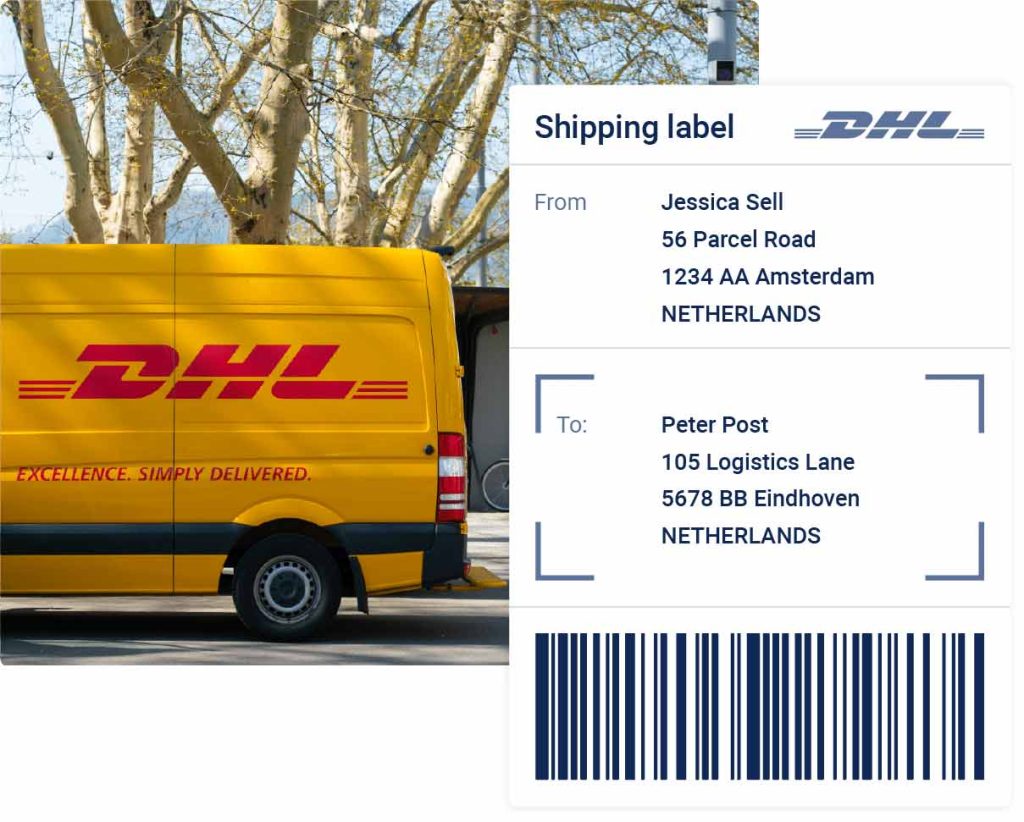
    Sendcloud visual

    IS THIS YOU?

    Who this Sendcloud integration is for

    Sendcloud can print a label for any carrier. It cannot tell you whether the box on the packing bench holds the right goods, or which order it belongs to.

    • You ship from your own warehouse and use Sendcloud, or plan to, for carrier labels and track & trace.
    • Your team still retypes order data into the shipping portal, or packs without scanning what was picked.
    • Returns, tracking questions and carrier choice cost more time than the shipping itself.

    Sendcloud provides an all-in-one shipping platform for e-commerce businesses that want to scale.Their mission is to empower online retailers to compete by optimizing the full shipping journey from checkout to returns. Their solution turns e-commerce logistics from a bottleneck into an accelerator, making shipping a competitive advantage.

    BIZBLOQS & SENDCLOUD

    Bizbloqs partnered with Sendcloud to increase the shipping options of its clients and to provide them with a multicarrier solution. Users will be able to both import their carrier contracts, or to use Sendcloud’s transactional rates with over 80 carriers.

    BIZBLOQS & SENDCLOUD

    BIZBLOQS & SENDCLOUD

    Moreover, Sendcloud makes it easy to build and automate custom workflows for picking, packing, and shipping, in order to assign the appropriate shipping method to each order.

    BizBloqs + Sendcloud

    WHAT CHANGES ONCE SENDCLOUD AND BIZBLOQS ARE CONNECTED

    The packer stops choosing carriers and stops retyping addresses. BizBloqs confirms what was actually picked, Sendcloud turns it into the right label, and the tracking status flows back to the order.

    Print Multicarrier Shipping Labels in One Click

    The label is created the moment the pack station confirms the order — on your own carrier contracts or on Sendcloud transactional rates with over 80 carriers, chosen by rule instead of by the packer.

    Feature-Rich Integrated Picking Solutions

    Paper pick lists disappear. Operators pick on a handheld with barcode verification, using batch, wave or zone picking, and the shipment is built from what was actually scanned.

    Continuously Evolving Return Portal

    Customers register a return themselves in the Sendcloud portal. The announced return lands in BizBloqs, so the warehouse knows what is coming back and books it to the right location and status.

    Joint Barcode Scanner Support

    One scan flow from pick to pack to label. The same devices throughout — no second handheld app just for shipping.

    Custom Tracking Page

    Track and trace runs under your own branding, fed by the shipment BizBloqs confirmed, so the status the customer sees matches the status in the warehouse.

    Custom Automation Rules

    Shipping method per order is decided by weight, value, destination, service level or channel — set once as a rule instead of judged at the packing table.

    This is what your Sendcloud setup looks like from day one

    See it on your own order flow. Thirty minutes, screen share, no slide deck — or tell us where it hurts today and we will tell you honestly whether we can fix it.

    Carrier integration

    How the Sendcloud integration works

    Sendcloud is a shipping platform, not an ERP, so the exchange has nothing to do with the ERP message set. What travels between BizBloqs and Sendcloud is parcels, labels and track & trace.

    Sendcloud — REST API plus webhooks

    API key/secret from your own Sendcloud account, status updates via webhook

    You generate an API key and secret inside your own Sendcloud account and enter them once in BizBloqs. When a shipment is confirmed at the pack station, BizBloqs calls Sendcloud, the carrier and service are selected by shipping rule, and the label comes back for printing within the pack flow. Sendcloud pushes status changes back over a webhook, so track & trace and delivery status land in BizBloqs without polling.

    What you need

    • A Sendcloud account with your carrier contracts configured
    • API key and secret generated in that account
    • Label printers reachable from the pack stations
    • Shipping rules agreed: which carrier and service for which order profile

    Which messages are exchanged

    The exchange is parcel-centric and runs at the moment of packing, not on a nightly schedule.

    SendcloudBizBloqs WMS
    Carriers and servicescore
    Into BizBloqsAvailable carriers, services and contracts
    Shipmentcore
    Out of BizBloqsParcel with address, weight, dimensions, service
    Labelcore
    Into BizBloqsPrintable label and parcel number
    Track & tracecore
    Into BizBloqsTracking code and status updates
    Multi-collooptional
    Out of BizBloqsMultiple parcels per shipment
    Returnsoptional
    Into BizBloqsReturn label and return status
    Out of BizBloqsReturn announcement
    Customs documentsoptional
    Into BizBloqsGenerated customs paperwork
    Out of BizBloqsContents, value and HS codes
    Cancellationcore
    Out of BizBloqsCancel a parcel before handover

    Returns and customs documents depend on the carrier contracts and destinations in your own Sendcloud account.

    This is our standard integration. An empty field means that message is not exchanged in that direction by default. Integrations can be modified or extended customer-specific through workflows.

    Track & trace: from label to delivered

    A tracking code is only worth something once it reaches the person asking about the order. This is the full relay chain between Sendcloud, BizBloqs and the system your order came from.

    The relay chain

    1. 1. Shipment booked

      When the packer confirms the shipment, BizBloqs announces the parcel to Sendcloud: address, weight, dimensions, service and the order reference. The shipping rule decides carrier and service, so the packer never picks one from a list.

    2. 2. Label returned

      Sendcloud returns the label (PDF or ZPL) and the parcel number. The label prints at the pack station inside the pack flow. A multi-collo shipment returns one label per colli, each with its own parcel number.

    3. 3. Tracking code stored

      The track & trace code is stored on the shipment in BizBloqs, per colli, alongside the carrier and service actually used. From this moment the code exists in the WMS and can be relayed onwards.

    4. 4. Status updates by webhook

      Sendcloud pushes status changes — collected, in transit, out for delivery, delivered, exception — to BizBloqs over a webhook. No polling, so the status in the warehouse is the carrier's status, not a cached guess.

    5. 5. Proof of delivery

      Where the carrier supplies it, the proof of delivery — signature, delivery photo, timestamp and receiver name — is attached to the shipment. Exceptions such as a refusal or a failed delivery arrive on the same channel and stay visible instead of disappearing.

    6. 6. Relayed to the order source

      BizBloqs relays the tracking code and the delivery status back to whichever system the order came from, and onward to the customer-facing channel. The warehouse is the single point where shipment truth is collected, and every downstream system reads the same value.

    Where the tracking code is relayed to

    BizBloqs holds the shipment truth and pushes it outward. Which of these run depends on which systems you have connected.

    • ERPThe shipment confirmation carries the carrier, the parcel numbers and the tracking codes, so the ERP can invoice and answer a where-is-my-order question without opening the WMS.
    • WebshopThe fulfilment posted to the webshop includes the carrier and the tracking code, which triggers the platform's own shipping confirmation and fills the my-account order page.
    • Marketplace channelMarketplaces score you on it, so the tracking code goes back on the channel's own shipment message inside the promised window, per colli where the channel supports it.
    • Customer notificationWhoever owns the customer relationship sends the notification: the carrier, the webshop or your ERP. BizBloqs supplies the code; it does not send marketing mail on your behalf.
    • Warehouse and service deskIn BizBloqs the shipment shows its current status and history, so a service desk can trace an order end to end — pick, pack, parcel, carrier status, proof of delivery — in one screen.

    Which statuses and documents are available is set by the carrier contract behind Sendcloud: not every carrier supplies a signature or a delivery photo, and proof of delivery on a pallet shipment differs from a parcel. We confirm per carrier what you will actually receive before go-live.

    How we roll it out

    1. 1. Account and contracts

      Your Sendcloud account is set up with the carrier contracts you want to ship on.

    2. 2. Connection

      API key and secret are entered in BizBloqs and the connection is validated against a test parcel.

    3. 3. Shipping rules

      We configure which carrier and service is chosen for which order profile: weight, destination, value, delivery promise.

    4. 4. Pack station test

      Label printing is tested at the physical pack station, including multi-collo and a cancellation.

    5. 5. Go-live

      Live shipping with track & trace flowing back into BizBloqs and on to your customer.

    Does your process fit this message set?

    This is our standard Sendcloud integration. If you need messages that are not in the table, send us your list — we tailor integrations per customer through workflows and will tell you upfront what is standard and what is custom.

    COMPANIES THAT RUN THEIR WAREHOUSE ON BIZBLOQS

    More than 200 implementations across wholesale, manufacturing, e-commerce and third-party logistics.

    Caressi — BizBloqs
    KTC — BizBloqs
    Probo — BizBloqs
    Neeltje Jans — BizBloqs
    NL Pharma — BizBloqs
    iXXXi — BizBloqs
    Lantaarn Publishers — BizBloqs
    Ahrend — BizBloqs
    GD Medical — BizBloqs
    STERIS — BizBloqs
    ESE International — BizBloqs
    Homeij — BizBloqs

    Integration FAQ

    Do we need our own carrier contracts?

    You can ship on Sendcloud's rates or on your own negotiated carrier contracts — both are configured in your Sendcloud account.

    When is the label created?

    At the moment of packing, when the shipment is confirmed in BizBloqs. The label prints in the pack flow so the packer never leaves the screen.

    How does track & trace get back to the customer?

    Sendcloud pushes status updates to BizBloqs over a webhook. From there the tracking code goes back to the order source — your ERP, webshop or marketplace channel.

    Can one order become multiple parcels?

    Yes. Multi-collo shipments are supported: several parcels are registered under one shipment and each gets its own label and tracking code.

    What about international shipments and customs?

    Contents, value and HS codes are sent with the shipment and Sendcloud generates the customs paperwork, provided your carrier contract covers the destination.

    Can a label be cancelled?

    Yes, up to handover to the carrier. Cancelling in BizBloqs cancels the parcel at Sendcloud too.

    Hear directly from our customers

    Why take our word for it? We let our customers convince you instead. BizBloqs customers are happy with their solutions and don’t hesitate to share their positive experiences. Our ability to turn any challenge into an efficient solution never fails to impress!

    Caressi

    Caressi logo
    Five star rating

    BizBloqs was one of the first to provide a WMS with scanning capabilities and we started a journey together. Our operations have gotten a lot more complex, advanced and especially bigger over the past 5 years and we have simply grown together.

    Nick Bisselink, Financial/Operational Director

    Lantaarn

    Lantaarn logo
    Five star rating

    When we had extensive logistic requirements beyond the capabilities of our financial solution, BizBloqs shared its expertise to transform Lantaarn’s entire warehouse experience together

    Lantaarn Publishers

    Fairplant

    Fairplant logo
    Five star rating

    We needed a better, more transparent and practical system for our incoming and outgoing product flow. A direct overview in our stock and all our logistics movements was really a must. BizBloqs helped us from the start!

    Rik Klein - Sales manager

    Neeltje Jans

    Neeltje Jans logo
    Five star rating

    In addition to a scan procedure with EDI integration, BizBloqs has set up an entire production system for us. Production planning can provide direct instructions and as soon as they are ready, it all arrives in the OMS. This gives us a larger production capacity and a drastic reduction of the picking mistakes in dispatching.

    Reinier Schot, Head of Production

    Caressi

    Caressi logo
    Five star rating

    BizBloqs was one of the first to provide a WMS with scanning capabilities and we started a journey together. Our operations have gotten a lot more complex, advanced and especially bigger over the past 5 years and we have simply grown together.

    Nick Bisselink, Financial/Operational Director

    Lantaarn

    Lantaarn logo
    Five star rating

    When we had extensive logistic requirements beyond the capabilities of our financial solution, BizBloqs shared its expertise to transform Lantaarn’s entire warehouse experience together

    Lantaarn Publishers

    Fairplant

    Fairplant logo
    Five star rating

    We needed a better, more transparent and practical system for our incoming and outgoing product flow. A direct overview in our stock and all our logistics movements was really a must. BizBloqs helped us from the start!

    Rik Klein - Sales manager

    Neeltje Jans

    Neeltje Jans logo
    Five star rating

    In addition to a scan procedure with EDI integration, BizBloqs has set up an entire production system for us. Production planning can provide direct instructions and as soon as they are ready, it all arrives in the OMS. This gives us a larger production capacity and a drastic reduction of the picking mistakes in dispatching.

    Reinier Schot, Head of Production

    Caressi

    Caressi logo
    Five star rating

    BizBloqs was one of the first to provide a WMS with scanning capabilities and we started a journey together. Our operations have gotten a lot more complex, advanced and especially bigger over the past 5 years and we have simply grown together.

    Nick Bisselink, Financial/Operational Director

    Lantaarn

    Lantaarn logo
    Five star rating

    When we had extensive logistic requirements beyond the capabilities of our financial solution, BizBloqs shared its expertise to transform Lantaarn’s entire warehouse experience together

    Lantaarn Publishers

    Fairplant

    Fairplant logo
    Five star rating

    We needed a better, more transparent and practical system for our incoming and outgoing product flow. A direct overview in our stock and all our logistics movements was really a must. BizBloqs helped us from the start!

    Rik Klein - Sales manager

    Neeltje Jans

    Neeltje Jans logo
    Five star rating

    In addition to a scan procedure with EDI integration, BizBloqs has set up an entire production system for us. Production planning can provide direct instructions and as soon as they are ready, it all arrives in the OMS. This gives us a larger production capacity and a drastic reduction of the picking mistakes in dispatching.

    Reinier Schot, Head of Production

    transform your business

    Ready to take the next step? Reach out and let's explore how BizBloqs can work for you.

    Download the app

    Google PlayApp Store