Most small businesses do not decide to buy warehouse software. They arrive at it, usually after a week where two customers received the wrong box, the webshop sold something that was not on the shelf, and someone spent an afternoon recounting a rack to find out which number was true.
The question underneath is fair: does an operation with one warehouse, a handful of pickers and a few thousand SKUs really need a warehouse management system, or is that something bigger companies buy? This article answers it with thresholds rather than opinions.
In short
- What it does: a WMS gives every item a location, directs each pick in sequence, and confirms every movement by scan — so the stock figure is a record of what happened, not an estimate.
- When a small business needs one: more than one picker per shift, more than one sales channel, batch or expiry obligations, or a spreadsheet that exists next to the system.
- What it is not: an ERP replacement. The ERP keeps finance, purchasing and valuation; the WMS runs execution on the floor.
- Cost: a subscription plus a bounded implementation, typically paying back in around six months for an SME with a normal error baseline.
- Time to live: weeks, when the platform is configured rather than developed.
The five thresholds that decide it
A low-movement operation with one person who knows where everything is does not need a WMS, and no honest vendor should sell one. The picture changes at a predictable set of points:
- Two or more pickers working the same SKUs. Knowledge that lives in one head stops being shared the moment two people need it at once.
- More than one sales channel on one stock pool. Webshop, marketplace and wholesale each promise the same unit until something reserves it.
- Batch, serial or expiry obligations. If a customer or auditor could ask which batch went where, the answer has to come from a system.
- Returns that have become a process. Inbound quality decisions need a place to happen and a record afterwards.
- A parallel record. A spreadsheet, a whiteboard or a memory of where things really are is the clearest signal of all — it means the system of record is not trusted.
Cross two of these and manual control is already costing more than the software would. Cross four and the cost is growing every month volume does.
What actually changes on the floor
The difference is not a nicer screen. It is that the work becomes directed and verified:
- Locations instead of areas. Every item has a bin, so "somewhere in aisle 3" stops being an answer and search time drops out of every order.
- Directed picking. The system sequences the route and tells the picker where to go next, rather than printing a list in order-entry sequence.
- Scan confirmation. The wrong item cannot be confirmed against the right line, which is where the step from the 85–95% accuracy range into 99%+ comes from.
- A one-day onboarding. A new or temporary picker follows the screen instead of learning the building, which is what makes peak staffing possible without a quality dip.
- A trail. Every movement is time-stamped and attributed, so a dispute is settled by looking rather than arguing.
Why the ERP stock module usually is not enough
Nearly every ERP includes inventory, and for a small operation it genuinely works for a while. It records quantity per warehouse and values it correctly, which is exactly what finance needs. What it does not do is direct physical work: it does not know bins, it does not route a pick path, and it records a transaction after the fact rather than verifying it as it happens.
That is why the two are complements, not alternatives. The ERP stays the system of record; the WMS becomes the system of execution and hands the ERP a stock figure it can trust. The full comparison is in WMS vs. ERP for SMBs.
What it costs a small business — and what it removes
The honest way to size this is not to start with the licence. Start with what the current process already spends: mispicks and the credit notes, return freight and service handling behind them; the minutes per order spent searching; the extra temp per shift through peak; the annual write-off; the margin lost to overselling.
Then ask the crude question first: is that a four-figure or a six-figure number per year? If it is genuinely four figures, keep the spreadsheet. It rarely is once returns and overtime are counted.
Against that sits a subscription plus a one-off implementation covering configuration, integrations, hardware and your own team's time. Divide the investment by the monthly cost removed and you have a payback period rather than a percentage. For an SME with a normal error baseline that lands around six months; where the baseline is poor, nearer two. Put your own volumes in the ROI calculator, or read the breakdown in what a WMS costs.
Choosing one without buying enterprise weight
The trap for a small business is not price; it is scope. Enterprise platforms assume a project team, a consultant and a quarter of configuration you will never fully use. What a small operation should insist on:
- Configured, not developed. Process changes should be a settings change, not a development bill next year.
- Integrations that already exist for your ERP, webshop, marketplaces and carriers — not a custom project per connection.
- Cloud delivery, so there is no server to own and no upgrade weekend.
- Standard hardware. Off-the-shelf scanners and label printers, not proprietary terminals.
- A first go-live measured in weeks, with one flow live and proven before the next one starts.
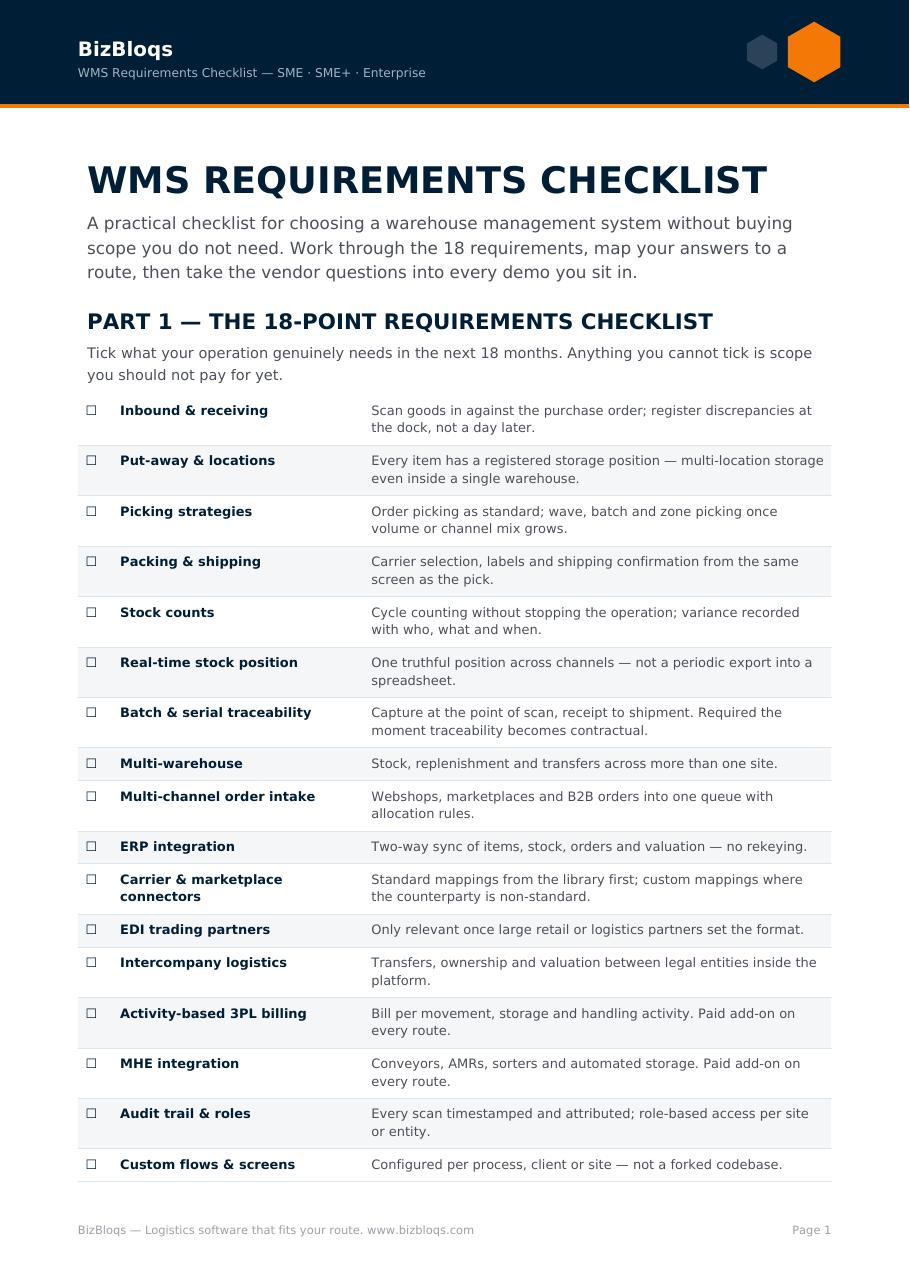
The WMS selection checklist turns this into questions you can put to any vendor, and the full WMS guide covers types, requirements and implementation in depth.
How a small warehouse goes live
A realistic sequence for an operation of this size: clean and load the item data, label locations, configure the inbound and outbound flows you actually run, connect the ERP and the sales channels, train on the floor for a day, then go live on one flow and add the rest once it is stable. The heavy part is data and labelling, not software — which is why it is measured in weeks when nothing has to be built.
Where BizBloqs fits
BizBloqs runs warehouse and order execution as a configurable service alongside the ERP you already have, which keeps the investment side small and the go-live close. It is the same platform for a five-person warehouse and a multi-site operation — what differs is how much of it you switch on. See what that looks like for your size on the SME route.
Operating outside the Netherlands? The same small-warehouse setup is sold and supported in English for the United Kingdom, Ireland, Australia, New Zealand, Singapore, South Africa, the United States and Canada — almost always on BizBloqs for SME.
Book a demo and we will walk your own process, not a generic one.
Which kind of system suits a small operation is set out in types of warehouse management systems.